
Skip to content
YB Digital: WWW Publisher Of The Year Runner-Up 2021

YB.Digital

  • Home
  • Articles
  • Web
  • Office productivity
  • Salesforce
  • Google
  • Social network
How to invite friends to like a page on Facebook : Invitation message to like Facebook page
Various

How to invite friends to like a page on Facebook

ybierling September 17, 2018September 13, 2018 Facebook business, Facebook friends, Facebook invite all friends to like page, Facebook like, Facebook likes, Facebook page, get likes, how to invite all Facebook friends to like a page, how to invite all friends to like a Facebook page, how to invite friends to like a page on Facebook, how to invite friends to like page on Facebook, invitation message to like Facebook page, invite all Facebook friends to like page, invite all friends to Facebook page, invite all friends to like Facebook page, invite all friends to like page, invite friends to like Facebook page, invite your friends, like Facebook, likes Facebook, my Facebook page, mypage, sample invitation message to like Facebook page

Quick links

  • Invite all friends to like Facebook page
  • Invite all friends to like page
  • Sample invitation message to like facebook page
  • How to invite friends to like page on Facebook

Invite all friends to like Facebook page

To invite all your friends to like a page, and therefore getting more likes on your Facebook business page, which will lead to increased interactions, follow the guide.

Start by logging in on Facebook, with a user that is administration a Facebook business page.

There, in the bottom right corner of the page on desktop, information on your pages are displayed, with a link to invite your friends.

Click on this link to continue to invite all friends to Facebook page.

How to invite friends to like a page on Facebook : How to invite all friends to like a Facebook page
How to invite all friends to like a Facebook page

Invite all friends to like page

There, in the invite your friends to like page, you can see which friends are not invited yet, but you can also find out which friends have already been invited.

In the not invited tab, simply click on Select all, to invite all Facebook friends to like page.

How to invite friends to like a page on Facebook : Facebook invite all friends to like page
Facebook invite all friends to like page

Our tip to increase page like from friends, check the Also send each invite in Messenger box. Like that, friends will chat up with you and find the invitation more personal.

In our tests, we got about 25% page like back from Messenger invite, compared to 10% with a simple page invite.

By checking the box to send a Messenger invite, the invite will be limited to 50 friends, simply repeat the operation as many times as necessary.

Sample invitation message to like facebook page

Before sending the invites, personalize the message to send them. Here are a few sample invitation message to like Facebook page, feel free to use them and adapt them to your page, friends, and needs :

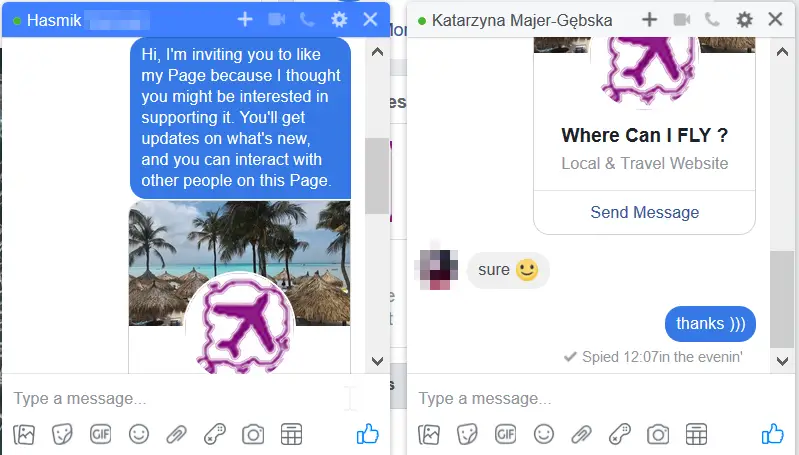
– Hi, I’m inviting you to like my Page because I thought you might be interested in supporting it. You’ll get updates on what’s new, and you can interact with other people on this Page.

– Hello dear friend, please have a look at my page, and follow it to get news about my business and my whereabouts. Would be great to see you interacting with my brand, let me know if you need any more info =)

– Hello, Michel here, we haven’t talked for a while, I’ve been busy working on my Page, would be great if you could support it and let me know what you think about our products. Happy to organize a discount for you and your friends whenever you’d like to order from us 😉

– Hello ! How are you doing ? I haven’t been much active on Facebook lately, because I post all my updates on my Page, would be great if you could like it to follow my latest adventures. Cheers 🙂

How to invite friends to like a page on Facebook : Invite friends to like Facebook page
Invite friends to like Facebook page

After having selected the friends that you want to invite to like your page, simply click on the send invites button.

If you have chosen to send invites on Messenger, then each of the selected friends will get right away a private message from you, inviting them to like the page.

How to invite friends to like a page on Facebook : How to invite people to like your Facebook page
How to invite people to like your Facebook page

How to invite friends to like page on Facebook

If not, then they will get a notification inviting them to like the page.

The invitation sending might take some time, as Facebook will send all invites as requested. After it is done, you can repeat the operation with another list of friends, until all your friends have been invited to like your Facebook page.

How to invite friends to like a page on Facebook : How to invite all Facebook friends to like a page
How to invite all Facebook friends to like a page

After that, check your notifications, you should quickly get some feedback on friends that accepted your page like invitation, in the bottom left corner when it happens, and after that in the standard notification area on the top right.

How to invite friends to like a page on Facebook : Friend accepted page like invitation
Friend accepted page like invitation

If invite was sent via messenger, all friends will get an invite looking like below screenshot.

Most likely, with this personalized message, friends will start asking you about your page, and will maybe directly tell you that they will like the page right away.

How to invite friends to like a page on Facebook : Invitation message to like Facebook page
Invitation message to like Facebook page

Like our travel page on Facebook

  • Amazon Associates OneLink – universal Amazon affiliate link
  • LinkedIn actively seeking employment setting

Affiliate Disclaimer

Please note that some of the links on our site are affiliate links, which means that if you click on one of the links and purchase an item, we may receive a commission.
Trainings and certifications for your IT projects: SAP, office, project management, and more skills

Recent Posts

  • Getting Started with Your Spocket Account and Interface
  • A Step-by-Step Guide to Creating Your Spocket Account
  • How to Find Products Using Keywords on Spocket
  • Connecting a Product to Your Store via the Import List
  • Connecting Your E-commerce Store to Spocket

Useful links

Website optimization
Hotel booking

Hotel booking
Hotel booking

Flight, hotel, car comparison and booking

Find local activities

Transfer money
Transfer money

Archives

  • January 2026 (4)
  • December 2025 (33)
  • November 2025 (30)
  • October 2025 (6)
  • September 2025 (2)
  • August 2025 (2)
  • April 2025 (1)
  • March 2025 (1)
  • February 2025 (1)
  • September 2024 (1)
  • July 2024 (2)
  • June 2024 (1)
  • April 2024 (1)
  • March 2024 (9)
  • February 2024 (3)
  • October 2023 (1)
  • September 2023 (1)
  • April 2023 (1)
  • March 2021 (1)
  • April 2020 (16)
  • March 2020 (9)
  • February 2020 (20)
  • January 2020 (11)
  • December 2019 (4)
  • November 2019 (20)
  • October 2019 (23)
  • September 2019 (15)
  • August 2019 (5)
  • June 2019 (3)
  • May 2019 (23)
  • April 2019 (17)
  • March 2019 (16)
  • February 2019 (20)
  • January 2019 (16)
  • December 2018 (21)
  • November 2018 (18)
  • October 2018 (2)
  • September 2018 (13)
  • August 2018 (4)
  • July 2018 (2)
  • June 2018 (3)
  • May 2018 (3)
  • April 2018 (1)
  • March 2018 (1)
  • February 2018 (1)
  • January 2018 (2)
  • September 2017 (2)
  • August 2017 (7)
  • July 2017 (10)
  • June 2017 (2)
  • April 2017 (8)
  • March 2017 (7)
  • February 2017 (5)
  • January 2017 (8)
  • December 2016 (26)
  • November 2016 (14)
  • October 2016 (10)
  • September 2016 (8)
  • August 2016 (3)
  • July 2016 (2)
  • June 2016 (1)
  • December 2015 (1)
  • August 2015 (5)
  • July 2015 (1)
  • April 2015 (1)
  • March 2015 (1)
  • October 2013 (1)
  • July 2013 (2)
  • April 2013 (1)
  • November 2012 (1)
  • October 2012 (1)
  • September 2012 (1)
  • April 2012 (1)
  • February 2012 (1)
  • December 2011 (1)
  • August 2011 (2)
  • May 2011 (2)
  • April 2011 (4)
  • March 2011 (1)
Copyright © 2026 YB.Digital. All rights reserved.
Theme: ColorMag by ThemeGrill. Powered by WordPress.