
Skip to content
YB Digital: WWW Publisher Of The Year Runner-Up 2021

YB.Digital

  • Home
  • Articles
  • Web
  • Office productivity
  • Salesforce
  • Google
  • Social network
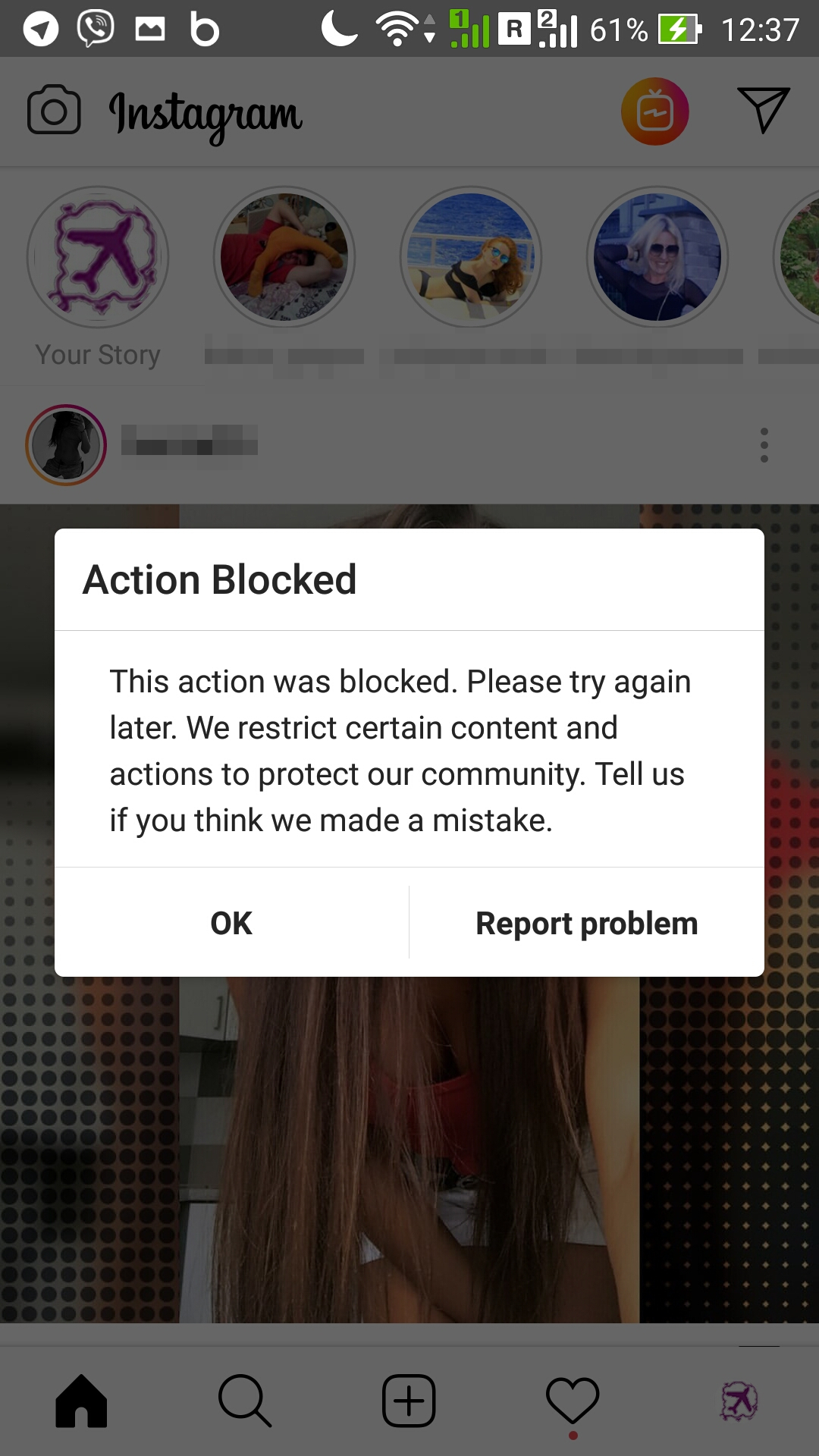
Instagram action blocked : Instagram temporarily blocked
Various

Instagram action blocked

ybierling September 11, 2018September 7, 2018 action blocked on instagram, app for liking pictures on instagram, app to block instagram followers, app to see who blocked you on instagram for free, how to fix temporarily blocked on instagram, how to get unblocked on instagram, instagram action blocked, instagram action blocked error, instagram action blocked following fix, instagram action blocked liking photos, instagram report a problem, instagram temporarily blocked, instagram unblocked, instagram unfollow app no limit, instagram wont let me like pictures, this action was blocked please try again later instagram, unblock instagram account, what is considered spam on instagram

How to get unblocked on instagram

It might happen that Instagram recognizes some accounts as spam and block them – which is probably your case if you ended up on this page.

Instagram action blocked : instagram temporarily blocked
instagram temporarily blocked

There are 5 ways to fix it, which can be tried one after the other :

  • link to other social media accounts,

  • Instagram report a problem,

  • wait for about 24hours to be unblocked,

  • uninstall other apps related to Instagram,

  • change IP address by switching to WiFi or mobile data – the quick fix to use your instagram account right away, while waiting to get permanently unblocked from the instagram action blocked liking photos.

Follow our travel account on Instagram

Link to other social media accounts

The first step when getting instagram action blocked error, is to try to setup a social media account, or disconnect and reconnect an existing one.

Instagram action blocked : Linked accounts in Instagram settings
Linked accounts in Instagram settings

This will show Instagram that the user is a real human with a real digital life, and not a bot commenting or liking all posts on the feed to get some rewarding likes back.

Instagram action blocked : Setting up linked accounts in Instagram
Setting up linked accounts in Instagram

Instagram report a problem

If that didn’t work, do not wait and report directly to Instagram, either right away from the action blocked on instagram, by using the report problem button.

Instagram action blocked : Problem reported on Instagram
Problem reported on Instagram

Or by going in the settings, where a convenient report a problem menu exists.

Instagram action blocked : Settings to report problem
Settings to report problem

Select report a problem, and explain the situation with eventual added screenshots. The Instagram team will then unblock your account as soon as they read your message, which might potentially take a lot of time, depending on how busy they are with other problems to solve.

Instagram action blocked : Instagram report a problem
Instagram report a problem

Wait for about 24 hours to be unblocked

What worked great in our case, was simply to wait for a few hours, and our account got automatically unblocked, without any specific notification.

Uninstall other related apps

If other apps are installed and using the instagram account, they might lead to account getting blocked, as they execute infinite successive actions, leading to instagram server overcharge. Deactivate them right away !

Possible type of external applications : app for liking pictures on instagram, app to block instagram followers, instagram unfollow app no limit, app to see who blocked you on instagram for free, and more.

Change IP address

This will surely solve the issue on short term. Simply turn off WiFi and turn on mobile data, or the inverse. This will trigger an internet address change – your phone will be identified on internet with another address, and Instagram will differentiate the new address from the one that was blocked.

That way, you will be able to access Instagram, while your main way of connection to the application is still blocked.

This workaround worked for us. Every hour, we tried again to access our account with WiFi, until it finally worked again as the account was unblocked.

Instagram action blocked : Switching off WiFi or Mobile data
Switching off WiFi or Mobile data

Instagram unblocked

Following above recommandations, your account should be shortly working again using your usual way of connecting to Instagram, just like it did for us !

This action was blocked please try again later instagram might however occur again if the same behavior is kept – for example liking or following like a robot, or even using robot applications, which might leads Instagram to believe a robot is using the account, and not a real human.

Instagram action blocked : Unblock instagram account
Unblock instagram account

What is considered spam on instagram

Liking pictures like a robot without discontinuing, following accounts after accounts, or posting the same comment everywhere very fast. Basically, all actions that a robot would be trained to do, and that would look boring to a standard human being !

Instagram wont let me like pictures

This is probably because your account has been blocked. See above the solution !

How to fix temporarily blocked on instagram

The Instagram action blocked following fix is simple, report the issue to instagram, switch from WiFi to mobile data, and wait a day or two, it should then go to back to normal.

How to Get Rid of Action Blocked on Instagram 
Follow our travel account on Instagram

  • How do I delete my Facebook account
  • Move wordpress site to new domain

Affiliate Disclaimer

Please note that some of the links on our site are affiliate links, which means that if you click on one of the links and purchase an item, we may receive a commission.
Trainings and certifications for your IT projects: SAP, office, project management, and more skills

Recent Posts

  • Getting Started with Your Spocket Account and Interface
  • A Step-by-Step Guide to Creating Your Spocket Account
  • How to Find Products Using Keywords on Spocket
  • Connecting a Product to Your Store via the Import List
  • Connecting Your E-commerce Store to Spocket

Useful links

Website optimization
Hotel booking

Hotel booking
Hotel booking

Flight, hotel, car comparison and booking

Find local activities

Transfer money
Transfer money

Archives

  • January 2026 (4)
  • December 2025 (33)
  • November 2025 (30)
  • October 2025 (6)
  • September 2025 (2)
  • August 2025 (2)
  • April 2025 (1)
  • March 2025 (1)
  • February 2025 (1)
  • September 2024 (1)
  • July 2024 (2)
  • June 2024 (1)
  • April 2024 (1)
  • March 2024 (9)
  • February 2024 (3)
  • October 2023 (1)
  • September 2023 (1)
  • April 2023 (1)
  • March 2021 (1)
  • April 2020 (16)
  • March 2020 (9)
  • February 2020 (20)
  • January 2020 (11)
  • December 2019 (4)
  • November 2019 (20)
  • October 2019 (23)
  • September 2019 (15)
  • August 2019 (5)
  • June 2019 (3)
  • May 2019 (23)
  • April 2019 (17)
  • March 2019 (16)
  • February 2019 (20)
  • January 2019 (16)
  • December 2018 (21)
  • November 2018 (18)
  • October 2018 (2)
  • September 2018 (13)
  • August 2018 (4)
  • July 2018 (2)
  • June 2018 (3)
  • May 2018 (3)
  • April 2018 (1)
  • March 2018 (1)
  • February 2018 (1)
  • January 2018 (2)
  • September 2017 (2)
  • August 2017 (7)
  • July 2017 (10)
  • June 2017 (2)
  • April 2017 (8)
  • March 2017 (7)
  • February 2017 (5)
  • January 2017 (8)
  • December 2016 (26)
  • November 2016 (14)
  • October 2016 (10)
  • September 2016 (8)
  • August 2016 (3)
  • July 2016 (2)
  • June 2016 (1)
  • December 2015 (1)
  • August 2015 (5)
  • July 2015 (1)
  • April 2015 (1)
  • March 2015 (1)
  • October 2013 (1)
  • July 2013 (2)
  • April 2013 (1)
  • November 2012 (1)
  • October 2012 (1)
  • September 2012 (1)
  • April 2012 (1)
  • February 2012 (1)
  • December 2011 (1)
  • August 2011 (2)
  • May 2011 (2)
  • April 2011 (4)
  • March 2011 (1)
Copyright © 2026 YB.Digital. All rights reserved.
Theme: ColorMag by ThemeGrill. Powered by WordPress.