
Skip to content
YB Digital: WWW Publisher Of The Year Runner-Up 2021

YB.Digital

  • Home
  • Articles
  • Web
  • Office productivity
  • Salesforce
  • Google
  • Social network
How to delete Instagram account
Various

How to delete Instagram account

ybierling February 11, 2019February 1, 2019 can you temporarily deactivate Instagram, delete Instagram account permanently link, how do you deactivate an Instagram account, how to deactivate Instagram on iPhone, how to delete an Instagram account permanently, how to delete Instagram account, how to delete Instagram account 2018, how to delete Instagram account 2019, how to delete Instagram account on iPhone, how to delete Instagram account permanently, how to delete multiple pictures on Instagram, how to reactivate Instagram after temporarily disabling, how to recover deleted Instagram messages, temporarily disable Instagram account

Deactivate or delete an Instagram account

Deactivating or deleting an Instagram account is not possible from the Instagram application. Both operations must be done from a specific webpage, by logging in on the Instagram website and accessing a specific link.

See below how to perform these operations in detail. Temporarily Disable Your Account on Instagram

Delete Instagram account permanently link
Taking a social media break? How to delete and deactivate your Instagram account
Follow the best travel Instagram account

How do you deactivate an Instagram account

Can you temporarily deactivate Instagram? Yes, to deactivate an Instagram account, access the Instagram deactivation link, on the Instagram website. There, login with the Instagram account you want to disable.

Temporarily deactivate an Instagram account

How to delete Instagram account : How do you deactivate an Instagram account, login Instagram website
How do you deactivate an Instagram account, login Instagram website

Once logged in on the webpage to temporarily disable your account, read carefully the information. It is only possible to perform this operation once per week, and once done, the account will not be accessible until it is activated again.

How to delete Instagram account : How do you deactivate an Instagram account, temporarily disable your account information
How do you deactivate an Instagram account, temporarily disable your account information

The first step is to select a reason for deactivating your Instagram account, which can be one of the following: data privacy concerns, you want to create a second account, you are too busy or IG is too distracting, you want to remove something, you just need a break, you are concerned about your data, you have troubles getting started, you can’t find people to follow, there are too many ads, or something else.

How to delete Instagram account : How do you deactivate an Instagram account, temporarily disable your account information reason selection
How do you deactivate an Instagram account, temporarily disable your account information reason selection

Once the reason to deactivate your Instagram account has been selected, the link to temporarily disable account will be enabled to click on it, or tap on it if you are on mobile phone.

How to delete Instagram account : How do you deactivate an Instagram account, temporarily disable your account button
How do you deactivate an Instagram account, temporarily disable your account button

After clicking on the link, a pop up will remind you that you are about to temporarily disable your Instagram account, and ask you to confirm to go ahead – this is the last step. Clicking yes will disable your Instagram account right away.

How do you deactivate an Instagram account

How to delete Instagram account : How do you deactivate an Instagram account, confirm temporarily disabling your account
How do you deactivate an Instagram account, confirm temporarily disabling your account

After that, the account will not be reachable anymore, and will not appear anymore in the search results of Instagram, as nobody can access your account now that it has been temporarily deactivated from Instagram.

Melissa Tyson Instagram account

How to delete Instagram account : How do you deactivate an Instagram account - account deactivated and not accessible anymore
How do you deactivate an Instagram account – account deactivated and not accessible anymore

How to deactivate Instagram on iPhone

To deactivate an Instagram account on iPhone, follow below link to Instagram website with the iPhone Internet browser, and follow the instructions after having logged on your Instagram account. The operation cannot be done from the Instagram application.

How to deactivate Instagram on iPhone

How to delete Instagram account : How to deactivate Instagram on iPhone, temporarily disable your account button
How to deactivate Instagram on iPhone, temporarily disable your account button

How to reactivate Instagram after temporarily disabling

After having temporarily disabling your Instagram account, and not having deleted it, if enough time has passed since the deactivation, you can reactivate your Instagram after temporarily disabling it by logging on the Instagram website and following the instructions to reactivate the Instagram account.

Reactivate Instagram after temporarily disabling link

How to delete Instagram account : How to reactivate Instagram after temporarily disabling, account disabled and not yet reactivated
How to reactivate Instagram after temporarily disabling, account disabled and not yet reactivated

How to delete an Instagram account permanently

To delete an Instagram account permanently, start by following below link and logon with the Instagram account you want to delete on IG website. The operation can only be done on the website with an Internet browser, and cannot be completed on the application.

Delete Instagram account permanently link

On that page, select the reason for which you want to permanently delete your account. It can be one of the following: you want to remove something, you are concerned about your data, you can’t find people to follow, you are too busy or the Instagram application is too distracting, you have troubles getting started, you have created a second account, there are too many ads, you have privacy concerns, or something else.

How to delete Instagram account : How to delete an Instagram account permanently, Instagram account deletion instructions and information
How to delete an Instagram account permanently, Instagram account deletion instructions and information

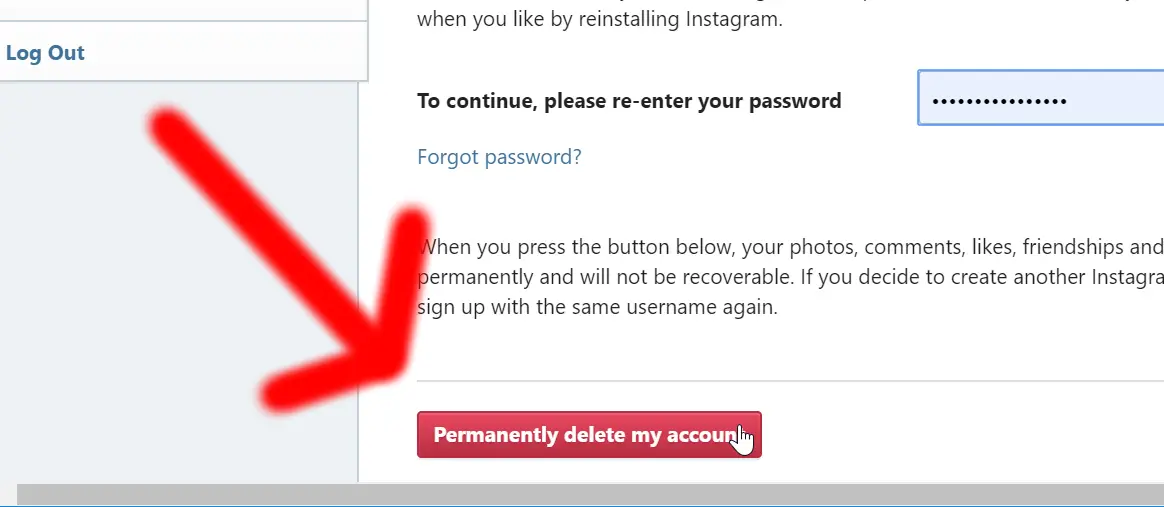
Depending on the reason you had chosen, Instagram will display solutions to the most common reasons to delete permanently an Instagram account. Maybe some of these solutions will make you change your mind. If that is not the case, click on the permanently delete my account button at the bottom of the page.

A pop up will ask for confirmation to delete permanently the Instagram account, answer carefully. As soon as you have confirmed the deletion, your Instagram account will be permanently deleted.

Delete Instagram account permanently link

How to delete Instagram account : How to delete an Instagram account permanently, permanently delete my account button
How to delete an Instagram account permanently, permanently delete my account button

After that, the account will not be reachable anymore, and will not appear anymore in the search results of Instagram, as nobody can access your account now that it has been permanently deleted from Instagram.

Melissa Tyson Instagram account

How to delete Instagram account : How to delete an Instagram account permanently, account permanently deleted not accessible anymore from Instagram
How to delete an Instagram account permanently, account permanently deleted not accessible anymore from Instagram

How to delete Instagram account on iPhone

To delete permanently an Instagram account on iPhone, open below link with an Internet browser, as the operation cannot be done on the Instagram application. Then, follow the instructions on the page to delete Instagram account on iPhone.

Delete Instagram account permanently link

How to delete Instagram account : How to delete Instagram account on iPhone, delete permanently Instagram account button
How to delete Instagram account on iPhone, delete permanently Instagram account button

How to delete multiple pictures on Instagram

It is not possible to delete multiple pictures on Instagram using the Instagram application. To do so, download external applications such as cleaner for Instagram unfollow, block and delete.

How to Delete All/Multiple Photos from Instagram? – Best Methods
Cleaner for Instagram Unfollow, Block and Delete for Android
Cleaner for IG Unfollow, block and delete for Apple iPhone

How to recover deleted Instagram messages

There is no correct way to recover deleted Instagram messages on any application. However, some external apps are claiming to be able to recover deleted IG messages, do it at your own risk, it will most likely not be without collateral damage, such as virus being installed on your phone.

Instagram Direct Messages: Recover Deleted Instagram DM on iPhone/Android
Follow the best travel Instagram account

  • How to make Instagram highlight covers
  • Instagram app keeps crashing

Affiliate Disclaimer

Please note that some of the links on our site are affiliate links, which means that if you click on one of the links and purchase an item, we may receive a commission.
Trainings and certifications for your IT projects: SAP, office, project management, and more skills

Recent Posts

  • Best Video Formats and Codecs for Web Streaming
  • Desk Jobs Are Killing Productivity—Here’s How Fitness Fixes It
  • Getting Started with Your Spocket Account and Interface
  • A Step-by-Step Guide to Creating Your Spocket Account
  • How to Find Products Using Keywords on Spocket

Useful links

Website optimization
Hotel booking

Hotel booking
Hotel booking

Flight, hotel, car comparison and booking

Find local activities

Transfer money
Transfer money

Archives

  • February 2026 (2)
  • January 2026 (4)
  • December 2025 (33)
  • November 2025 (30)
  • October 2025 (6)
  • September 2025 (2)
  • August 2025 (2)
  • April 2025 (1)
  • March 2025 (1)
  • February 2025 (1)
  • September 2024 (1)
  • July 2024 (2)
  • June 2024 (1)
  • April 2024 (1)
  • March 2024 (9)
  • February 2024 (3)
  • October 2023 (1)
  • September 2023 (1)
  • April 2023 (1)
  • March 2021 (1)
  • April 2020 (16)
  • March 2020 (9)
  • February 2020 (20)
  • January 2020 (11)
  • December 2019 (4)
  • November 2019 (20)
  • October 2019 (23)
  • September 2019 (15)
  • August 2019 (5)
  • June 2019 (3)
  • May 2019 (23)
  • April 2019 (17)
  • March 2019 (16)
  • February 2019 (20)
  • January 2019 (16)
  • December 2018 (21)
  • November 2018 (18)
  • October 2018 (2)
  • September 2018 (13)
  • August 2018 (4)
  • July 2018 (2)
  • June 2018 (3)
  • May 2018 (3)
  • April 2018 (1)
  • March 2018 (1)
  • February 2018 (1)
  • January 2018 (2)
  • September 2017 (2)
  • August 2017 (7)
  • July 2017 (10)
  • June 2017 (2)
  • April 2017 (8)
  • March 2017 (7)
  • February 2017 (5)
  • January 2017 (8)
  • December 2016 (26)
  • November 2016 (14)
  • October 2016 (10)
  • September 2016 (8)
  • August 2016 (3)
  • July 2016 (2)
  • June 2016 (1)
  • December 2015 (1)
  • August 2015 (5)
  • July 2015 (1)
  • April 2015 (1)
  • March 2015 (1)
  • October 2013 (1)
  • July 2013 (2)
  • April 2013 (1)
  • November 2012 (1)
  • October 2012 (1)
  • September 2012 (1)
  • April 2012 (1)
  • February 2012 (1)
  • December 2011 (1)
  • August 2011 (2)
  • May 2011 (2)
  • April 2011 (4)
  • March 2011 (1)
Copyright © 2026 YB.Digital. All rights reserved.
Theme: ColorMag by ThemeGrill. Powered by WordPress.